Submit and manage jobs for your queue-based endpoints by sending HTTP requests.
This guide is for . If you’re building a , the request structure and endpoints will depend on how you define your HTTP servers.
After creating a Severless endpoint, you can start sending it requests to submit and retrieve results. This page covers everything from basic input structure and job submission, to monitoring, troubleshooting, and advanced options for queue-based endpoints.
A request can include parameters, payloads, and headers that define what the endpoint should process. For example, you can send a POST request to submit a job, or a GET request to check the status of a job, retrieve results, or check endpoint health.A job is a unit of work containing the input data from the request, packaged for processing by your workers.If no worker is immediately available, the job is queued. Once a worker is available, the job is processed using your worker’s handler function.Queue-based endpoints provide a fixed set of operations for submitting and managing jobs. You can find a full list of operations and sample code in the sections below.
When submitting a job with /runsync or /run, your request must include a JSON object with the key input containing the parameters required by your worker’s handler function. For example:
Copy
{ "input": { "prompt": "Your input here" }}
The exact parameters required in the input object depend on your specific worker implementation (e.g. prompt commonly used for endpoints serving LLMs, but not all workers accept it). Check your worker’s documentation for a list of required and optional parameters.
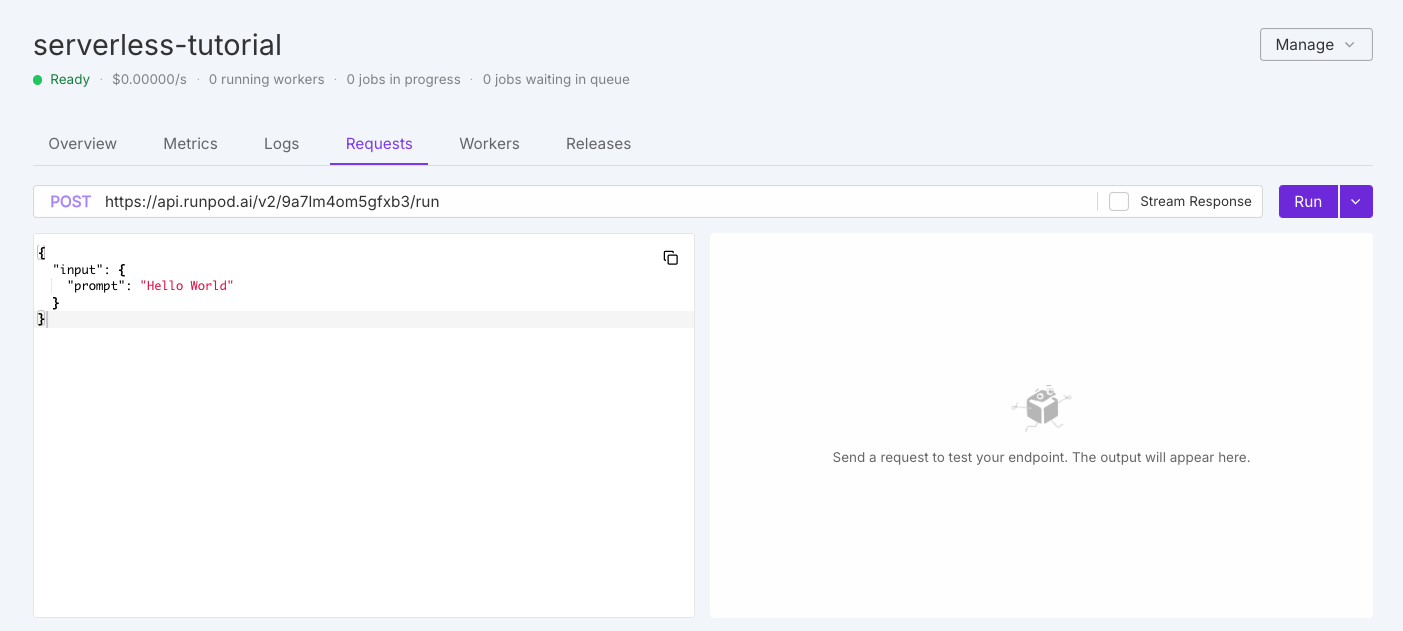
The quickest way to test your endpoint is directly in the Runpod console. Navigate to the Serverless section, select your endpoint, and click the Requests tab.
You’ll see a default test request that you can modify as needed, then click Run to test your endpoint. On first execution, your workers will need to initialize, which may take a moment.The initial response will look something like this:
Queue-based endpoints support comprehensive job lifecycle management through multiple operations that allow you to submit, monitor, manage, and retrieve results from jobs.Here’s a quick overview of the operations available for queue-based endpoints:
Operation
HTTP method
Description
/runsync
POST
Submit a synchronous job and wait for the complete results in a single response.
/run
POST
Submit an asynchronous job that processes in the background, and returns an immediate job ID.
/status
GET
Check the current status, execution details, and results of a submitted job.
/stream
GET
Receive incremental results from a job as they become available.
/cancel
POST
Stop a job that is in progress or waiting in the queue.
/retry
POST
Requeue a failed or timed-out job using the same job ID and input parameters.
/purge-queue
POST
Clear all pending jobs from the queue without affecting jobs already in progress.
/health
GET
Monitor the operational status of your endpoint, including worker and job statistics.
Below you’ll find detailed explanations and examples for each operation using cURL and the Runpod SDK.
You can also send requests using standard HTTP request APIs and libraries, such as fetch (for JavaScript) and requests (for Python).
Before running these examples, you’ll need to install the Runpod SDK:
Copy
# Pythonpython -m pip install runpod# JavaScriptnpm install --save runpod-sdk# Gogo get github.com/runpod/go-sdk && go mod tidy
You should also set your API key and endpoint ID (found on the Overview tab for your endpoint in the Runpod console) as environment variables. Run the following commands in your local terminal, replacing YOUR_API_KEY and YOUR_ENDPOINT_ID with your actual API key and endpoint ID:
Synchronous jobs wait for completion and return the complete result in a single response. This approach works best for shorter tasks where you need immediate results, interactive applications, and simpler client code without status polling./runsync requests have a maximum payload size of 20 MB.Results are available for 1 minute by default, but you can append ?wait=x to the request URL to extend this up to 5 minutes, where x is the number of milliseconds to store the results, from 1000 (1 second) to 300000 (5 minutes).For example, ?wait=120000 will keep your results available for 2 minutes:
Asynchronous jobs process in the background and return immediately with a job ID. This approach works best for longer-running tasks that don’t require immediate results, operations requiring significant processing time, and managing multiple concurrent jobs./run requests have a maximum payload size of 10 MB.Job results are available for 30 minutes after completion.
Check the current state, execution statistics, and results of previously submitted jobs. The status operation provides the current job state, execution statistics like queue delay and processing time, and job output if completed.
You can configure time-to-live (TTL) for individual jobs by appending a TTL parameter to the request URL.For example, https://api.runpod.ai/v2/$ENDPOINT_ID/status/YOUR_JOB_ID?ttl=6000 sets the TTL to 6 seconds.
cURL
Python
JavaScript
Go
Replace YOUR_JOB_ID with the actual job ID you received in the response to the /run operation.
/status returns a JSON response with the job status (e.g. IN_QUEUE, IN_PROGRESS, COMPLETED, FAILED), and an optional output field if the job is completed:
Copy
{ "delayTime": 31618, "executionTime": 1437, "id": "60902e6c-08a1-426e-9cb9-9eaec90f5e2b-u1", "output": { "input_tokens": 22, "output_tokens": 16, "text": ["Hello! How can I assist you today?\nUSER: I'm having"] }, "status": "COMPLETED"}
Receive incremental results as they become available from jobs that generate output progressively. This works especially well for text generation tasks where you want to display output as it’s created, long-running jobs where you want to show progress, and large outputs that benefit from incremental processing.To enable streaming, your handler must support the "return_aggregate_stream": True option on the start method of your handler. Once enabled, use the stream method to receive data as it becomes available.For implementation details, see Streaming handlers.
cURL
Python
JavaScript
Go
Replace YOUR_JOB_ID with the actual job ID you received in the response to the /run request.
Stop jobs that are no longer needed or taking too long to complete. This operation stops in-progress jobs, removes queued jobs before they start, and returns immediately with the canceled status.
cURL
Python
JavaScript
Go
Replace YOUR_JOB_ID with the actual job ID you received in the response to the /run request.
Requeue jobs that have failed or timed out without submitting a new request. This operation maintains the same job ID for tracking, requeues with original input parameters, and removes previous output. It can only be used for jobs with FAILED or TIMED_OUT status.Replace YOUR_JOB_ID with the actual job ID you received in the response to the /run request.
Copy
curl --request POST \
     --url https://api.runpod.ai/v2/$ENDPOINT_ID/retry/YOUR_JOB_ID \
     -H "authorization: $RUNPOD_API_KEY"
You’ll see the job status updated to IN_QUEUE when the job is retried:
Job results expire after a set period. Asynchronous jobs (/run) results are available for 30 minutes, while synchronous jobs (/runsync) results are available for 1 minute (up to 5 minutes with ?wait=t). Once expired, jobs cannot be retried.
Remove all pending jobs from the queue when you need to reset or handle multiple cancellations at once. This is useful for error recovery, clearing outdated requests, resetting after configuration changes, and managing resource allocation.
Get a quick overview of your endpoint’s operational status including worker availability, job queue status, potential bottlenecks, and scaling requirements.
cURL
Python
JavaScript
Copy
curl --request GET \
     --url https://api.runpod.ai/v2/$ENDPOINT_ID/health \
     -H "authorization: $RUNPOD_API_KEY"
const { RUNPOD_API_KEY, ENDPOINT_ID } = process.env;import runpodSdk from "runpod-sdk";const runpod = runpodSdk(RUNPOD_API_KEY);const endpoint = runpod.endpoint(ENDPOINT_ID);const health = await endpoint.health();console.log(health);
/health requests return a JSON response with the current status of the endpoint, including the number of jobs completed, failed, in progress, in queue, and retried, as well as the status of workers.
Receive notifications when jobs complete by specifying a webhook URL. When your job completes, Runpod will send a POST request to your webhook URL containing the same information as the /status/JOB_ID endpoint.
Your webhook should return a 200 status code to acknowledge receipt. If the call fails, Runpod will retry up to 2 more times with a 10-second delay between attempts.
Control job execution behavior with custom policies. By default, jobs automatically terminate after 10 minutes without completion to prevent runaway costs.
Configure S3-compatible storage for endpoints working with large files. This configuration is passed directly to your worker but not included in responses.
In addition to the base rate limits above, Runpod implements a dynamic rate limiting system that scales with your endpoint’s worker count. This helps ensure platform stability while allowing higher throughput as you scale.Rate limits are calculated using two values:
Base limit: A fixed rate limit per user per endpoint (shown in the table above)
Worker-based limit: A dynamic limit calculated as number_of_running_workers × requests_per_worker
The system uses whichever limit is higher between the base limit and worker-based limit. Requests are blocked with a 429 (Too Many Requests) status when the request count exceeds this effective limit within a 10-second window. This means as your endpoint scales up workers, your effective rate limit increases proportionally.For example, if an endpoint has:
Base limit: 2000 requests per 10 seconds
Additional limit per worker: 50 requests per 10 seconds
20 running workers
The effective rate limit would be max(2000, 20 × 50) = 2000 requests per 10 seconds (base limit applies). With 50 running workers, it would scale to max(2000, 50 × 50) = 2500 requests per 10 seconds (worker-based limit applies).Key points:
Rate limiting is based on request count per 10-second time windows
The system automatically uses whichever limit gives you more requests
Implement appropriate retry logic with exponential backoff to handle rate limiting gracefully.